Single-Domain SR-TE その10(On Demand Next-hop:ODN with L3VPN)
On Demand Next-hop:ODN with L3VPN が理解できたので自分のメモ用にアウトプットします。
- 1. On Demand Next-hop:ODN
- 2. Topology
- 3. Config
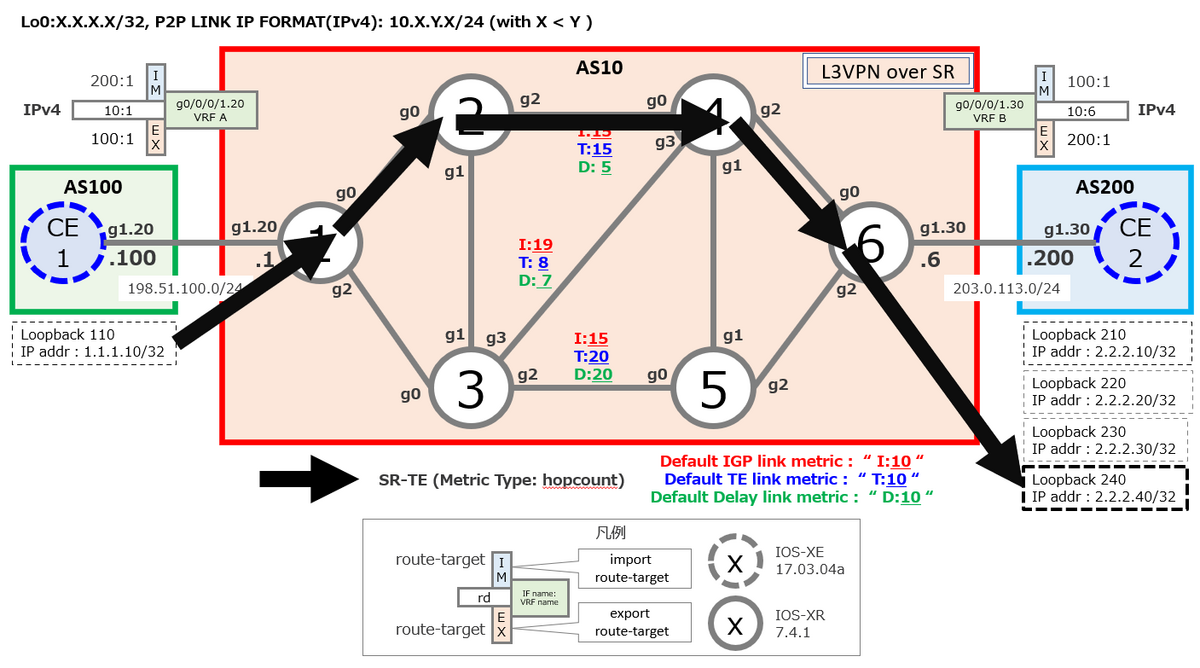
- 4.下準備(各種メトリックの仕込み)
- 5. ODN の実装
- 5.2 Head-End(h_N1)
- 5.3 End-point(h_N6)
- 6. 検証
- 7. もしかして ODN って Head-end のみでも定義できる?
- 8. 参考
1. On Demand Next-hop:ODN
ODNはSR-PolicyのInstance化を自動化するもので、指定の Prefix をオンデマンドに SR-TE に反映します。
今回は、Dynamic SR-TE を使ったODN(L3VPN)を検証します。
2. Topology

3. Config
◆h_N1
hostname h_N1
group CCIE-ISIS
 router isis '.*'
  is-type level-2-only
  address-family ipv4 unicast
   metric-style wide
   segment-routing mpls
  !
  interface 'Gi.*'
   point-to-point
   address-family ipv4 unicast
   !
  !
  interface 'Loopback .*'
   address-family ipv4 unicast
   !
  !
 !
end-group
!
vrf A
 rd 10:1
 address-family ipv4 unicast
  import route-target
   200:1
  !
  export route-target
   100:1
  !
 !
!
interface Loopback0
 ipv4 address 1.1.1.1 255.255.255.255
!
interface MgmtEth0/RP0/CPU0/0
 shutdown
!
interface GigabitEthernet0/0/0/0
 ipv4 address 10.1.2.1 255.255.255.0
!
interface GigabitEthernet0/0/0/1.20
 vrf A
 ipv4 address 198.51.100.1 255.255.255.0
 encapsulation dot1q 20
!
interface GigabitEthernet0/0/0/2
 ipv4 address 10.1.3.1 255.255.255.0
!
interface GigabitEthernet0/0/0/3
 shutdown
!
interface GigabitEthernet0/0/0/4
 shutdown
!
route-policy PASS
  pass
end-policy
!
router isis 1
 apply-group CCIE-ISIS
 net 49.0001.0000.0000.0001.00
 distribute link-state level 2
 address-family ipv4 unicast
  mpls traffic-eng level-2-only
  mpls traffic-eng router-id Loopback0
 !
 interface Loopback0
  address-family ipv4 unicast
   prefix-sid index 1
  !
 !
 interface GigabitEthernet0/0/0/0
 !
 interface GigabitEthernet0/0/0/2
 !
!
router bgp 10
 bgp router-id 1.1.1.1
 address-family vpnv4 unicast
 !
 neighbor 6.6.6.6
  remote-as 10
  update-source Loopback0
  address-family vpnv4 unicast
  !
 !
 vrf A
  rd 10:1
  address-family ipv4 unicast
  !
  neighbor 198.51.100.100
   remote-as 100
   address-family ipv4 unicast
    route-policy PASS in
    route-policy PASS out
   !
  !
 !
!
mpls oam
!
segment-routing
 traffic-eng
  on-demand color 10
   dynamic
    metric
     type te
    !
   !
  !
  on-demand color 20
   dynamic
    metric
     type igp
    !
   !
  !
  on-demand color 30
   dynamic
    metric
     type latency
    !
   !
  !
  on-demand color 40
   dynamic
    metric
     type hopcount
    !
   !
  !
 !
!
mpls label range table 0 1001001 1001999
end
◆h_N2
hostname h_N2
group CCIE-ISIS
 router isis '.*'
  is-type level-2-only
  address-family ipv4 unicast
   metric-style wide
   segment-routing mpls
  !
  interface 'Gi.*'
   point-to-point
   address-family ipv4 unicast
   !
  !
  interface 'Loopback .*'
   address-family ipv4 unicast
   !
  !
 !
end-group
!
interface Loopback0
 ipv4 address 2.2.2.2 255.255.255.255
!
interface MgmtEth0/RP0/CPU0/0
 shutdown
!
interface GigabitEthernet0/0/0/0
 ipv4 address 10.1.2.2 255.255.255.0
!
interface GigabitEthernet0/0/0/1
 ipv4 address 10.2.3.2 255.255.255.0
!
interface GigabitEthernet0/0/0/2
 ipv4 address 10.2.4.2 255.255.255.0
!
interface GigabitEthernet0/0/0/3
 shutdown
!
interface GigabitEthernet0/0/0/4
 shutdown
!
router isis 1
 apply-group CCIE-ISIS
 net 49.0001.0000.0000.0002.00
 address-family ipv4 unicast
  mpls traffic-eng level-2-only
  mpls traffic-eng router-id Loopback0
 !
 interface Loopback0
  address-family ipv4 unicast
   prefix-sid index 2
  !
 !
 interface GigabitEthernet0/0/0/0
 !
 interface GigabitEthernet0/0/0/1
 !
 interface GigabitEthernet0/0/0/2
  address-family ipv4 unicast
   metric 15
  !
 !
!
mpls oam
!
segment-routing
 traffic-eng
  interface GigabitEthernet0/0/0/2
   metric 15
  !
 !
!
performance-measurement
 interface GigabitEthernet0/0/0/2
  delay-measurement
   advertise-delay 5
  !
 !
!
end
◆h_N3
hostname h_N3
group CCIE-ISIS
 router isis '.*'
  is-type level-2-only
  address-family ipv4 unicast
   metric-style wide
   segment-routing mpls
  !
  interface 'Gi.*'
   point-to-point
   address-family ipv4 unicast
   !
  !
  interface 'Loopback .*'
   address-family ipv4 unicast
   !
  !
 !
end-group
!
interface Loopback0
 ipv4 address 3.3.3.3 255.255.255.255
!
interface MgmtEth0/RP0/CPU0/0
 shutdown
!
interface GigabitEthernet0/0/0/0
 ipv4 address 10.1.3.3 255.255.255.0
!
interface GigabitEthernet0/0/0/1
 ipv4 address 10.2.3.3 255.255.255.0
!
interface GigabitEthernet0/0/0/2
 ipv4 address 10.3.5.3 255.255.255.0
!
interface GigabitEthernet0/0/0/3
 ipv4 address 10.3.4.3 255.255.255.0
!
interface GigabitEthernet0/0/0/4
 shutdown
!
router isis 1
 apply-group CCIE-ISIS
 net 49.0001.0000.0000.0003.00
 address-family ipv4 unicast
  mpls traffic-eng level-2-only
  mpls traffic-eng router-id Loopback0
 !
 interface Loopback0
  address-family ipv4 unicast
   prefix-sid index 3
  !
 !
 interface GigabitEthernet0/0/0/0
 !
 interface GigabitEthernet0/0/0/1
 !
 interface GigabitEthernet0/0/0/2
  address-family ipv4 unicast
   metric 15
  !
 !
 interface GigabitEthernet0/0/0/3
  address-family ipv4 unicast
   metric 19
  !
 !
!
mpls oam
!
segment-routing
 traffic-eng
  interface GigabitEthernet0/0/0/2
   metric 20
  !
  interface GigabitEthernet0/0/0/3
   metric 8
  !
 !
!
performance-measurement
 interface GigabitEthernet0/0/0/2
  delay-measurement
   advertise-delay 20
  !
 !
 interface GigabitEthernet0/0/0/3
  delay-measurement
   advertise-delay 7
  !
 !
!
end
◆h_N4
hostname h_N4
group CCIE-ISIS
 router isis '.*'
  is-type level-2-only
  address-family ipv4 unicast
   metric-style wide
   segment-routing mpls
  !
  interface 'Gi.*'
   point-to-point
   address-family ipv4 unicast
   !
  !
  interface 'Loopback .*'
   address-family ipv4 unicast
   !
  !
 !
end-group
!
interface Loopback0
 ipv4 address 4.4.4.4 255.255.255.255
!
interface MgmtEth0/RP0/CPU0/0
 shutdown
!
interface GigabitEthernet0/0/0/0
 ipv4 address 10.2.4.4 255.255.255.0
!
interface GigabitEthernet0/0/0/1
 ipv4 address 10.4.5.4 255.255.255.0
!
interface GigabitEthernet0/0/0/2
 ipv4 address 10.4.6.4 255.255.255.0
!
interface GigabitEthernet0/0/0/3
 ipv4 address 10.3.4.4 255.255.255.0
!
interface GigabitEthernet0/0/0/4
 shutdown
!
router isis 1
 apply-group CCIE-ISIS
 net 49.0001.0000.0000.0004.00
 address-family ipv4 unicast
  mpls traffic-eng level-2-only
  mpls traffic-eng router-id Loopback0
 !
 interface Loopback0
  prefix-attributes anycast
  address-family ipv4 unicast
   prefix-sid index 4
  !
 !
 interface GigabitEthernet0/0/0/0
  address-family ipv4 unicast
   metric 15
  !
 !
 interface GigabitEthernet0/0/0/1
 !
 interface GigabitEthernet0/0/0/2
 !
 interface GigabitEthernet0/0/0/3
  address-family ipv4 unicast
   metric 19
  !
 !
!
mpls oam
!
segment-routing
 traffic-eng
  interface GigabitEthernet0/0/0/0
   metric 15
  !
  interface GigabitEthernet0/0/0/3
   metric 8
  !
 !
!
performance-measurement
 interface GigabitEthernet0/0/0/0
  delay-measurement
   advertise-delay 5
  !
 !
 interface GigabitEthernet0/0/0/3
  delay-measurement
   advertise-delay 7
  !
 !
!
end
◆h_N5
hostname h_N5
group CCIE-ISIS
 router isis '.*'
  is-type level-2-only
  address-family ipv4 unicast
   metric-style wide
   segment-routing mpls
  !
  interface 'Gi.*'
   point-to-point
   address-family ipv4 unicast
   !
  !
  interface 'Loopback .*'
   address-family ipv4 unicast
   !
  !
 !
end-group
!
interface Loopback0
 ipv4 address 5.5.5.5 255.255.255.255
!
interface MgmtEth0/RP0/CPU0/0
 shutdown
!
interface GigabitEthernet0/0/0/0
 ipv4 address 10.3.5.5 255.255.255.0
!
interface GigabitEthernet0/0/0/1
 ipv4 address 10.4.5.5 255.255.255.0
!
interface GigabitEthernet0/0/0/2
 ipv4 address 10.5.6.5 255.255.255.0
!
interface GigabitEthernet0/0/0/3
 shutdown
!
interface GigabitEthernet0/0/0/4
 shutdown
!
router isis 1
 apply-group CCIE-ISIS
 net 49.0001.0000.0000.0005.00
 address-family ipv4 unicast
  mpls traffic-eng level-2-only
  mpls traffic-eng router-id Loopback0
 !
 interface Loopback0
  prefix-attributes anycast
  address-family ipv4 unicast
   prefix-sid index 5
  !
 !
 interface GigabitEthernet0/0/0/0
  address-family ipv4 unicast
   metric 15
  !
 !
 interface GigabitEthernet0/0/0/1
 !
 interface GigabitEthernet0/0/0/2
 !
!
mpls oam
!
segment-routing
 traffic-eng
  interface GigabitEthernet0/0/0/0
   metric 20
  !
 !
!
performance-measurement
 interface GigabitEthernet0/0/0/0
  delay-measurement
   advertise-delay 20
  !
 !
!
end
◆h_N6
hostname h_N6
group CCIE-ISIS
 router isis '.*'
  is-type level-2-only
  address-family ipv4 unicast
   metric-style wide
   segment-routing mpls
  !
  interface 'Gi.*'
   point-to-point
   address-family ipv4 unicast
   !
  !
  interface 'Loopback .*'
   address-family ipv4 unicast
   !
  !
 !
end-group
!
vrf B
 rd 10:6
 address-family ipv4 unicast
  import route-target
   100:1
  !
  export route-target
   200:1
  !
 !
!
interface Loopback0
 ipv4 address 6.6.6.6 255.255.255.255
!
interface MgmtEth0/RP0/CPU0/0
 shutdown
!
interface GigabitEthernet0/0/0/0
 ipv4 address 10.4.6.6 255.255.255.0
!
interface GigabitEthernet0/0/0/1.30
 vrf B
 ipv4 address 203.0.113.6 255.255.255.0
 encapsulation dot1q 30
!
interface GigabitEthernet0/0/0/2
 ipv4 address 10.5.6.6 255.255.255.0
!
interface GigabitEthernet0/0/0/3
 shutdown
!
interface GigabitEthernet0/0/0/4
 shutdown
!
extcommunity-set opaque COLOR_10_TE
  10
end-set
!
extcommunity-set opaque COLOR_20_IGP
  20
end-set
!
extcommunity-set opaque COLOR_30_DELAY
  30
end-set
!
extcommunity-set opaque COLOR_40_HOPCOUNT
  40
end-set
!
route-policy PASS
  pass
end-policy
!
route-policy SET_COLOR_HI_BW
  set extcommunity color COLOR_20_IGP
  pass
end-policy
!
route-policy SET_COLOR_GLOBAL
  if destination in (2.2.2.10/32) then
    set extcommunity color COLOR_10_TE
  elseif destination in (2.2.2.20/32) then
    set extcommunity color COLOR_20_IGP
  elseif destination in (2.2.2.30/32) then
    set extcommunity color COLOR_30_DELAY
  elseif destination in (2.2.2.40/32) then
    set extcommunity color COLOR_40_HOPCOUNT
  endif
end-policy
!
route-policy SET_COLOR_HOPCOUNT
  set extcommunity color COLOR_40_HOPCOUNT
  pass
end-policy
!
route-policy SET_COLOR_LOW_LATENCY
  set extcommunity color COLOR_30_DELAY
  pass
end-policy
!
route-policy SET_COLOR_LOW_LATENCY_TE
  set extcommunity color COLOR_10_TE
  pass
end-policy
!
router isis 1
 apply-group CCIE-ISIS
 net 49.0001.0000.0000.0006.00
 address-family ipv4 unicast
  mpls traffic-eng level-2-only
  mpls traffic-eng router-id Loopback0
 !
 interface Loopback0
  address-family ipv4 unicast
   prefix-sid index 6
  !
 !
 interface GigabitEthernet0/0/0/0
 !
 interface GigabitEthernet0/0/0/2
 !
!
router bgp 10
 bgp router-id 6.6.6.6
 address-family vpnv4 unicast
 !
 neighbor 1.1.1.1
  remote-as 10
  update-source Loopback0
  address-family vpnv4 unicast
   route-policy SET_COLOR_GLOBAL out
  !
 !
 vrf B
  rd 10:6
  address-family ipv4 unicast
  !
  neighbor 203.0.113.200
   remote-as 200
   address-family ipv4 unicast
    route-policy PASS in
    route-policy PASS out
   !
  !
 !
!
mpls oam
!
segment-routing
 traffic-eng
 !
!
mpls label range table 0 1006001 1006999
end
◆h_CE1
hostname CE1
!
no ip domain lookup
!
interface Loopback0
 ip address 100.100.100.100 255.255.255.255
!
interface Loopback110
 ip address 1.1.1.10 255.255.255.255
!
interface GigabitEthernet1
 no ip address
!
interface GigabitEthernet1.10
 encapsulation dot1Q 10
 ip address 192.0.2.100 255.255.255.0
!
interface GigabitEthernet1.20
 encapsulation dot1Q 20
 ip address 198.51.100.100 255.255.255.0
!
router bgp 100
 bgp router-id 100.100.100.100
 bgp log-neighbor-changes
 network 1.1.1.10 mask 255.255.255.255
 neighbor 198.51.100.1 remote-as 10
!
line con 0
 exec-timeout 0 0
!
end
◆h_CE2
hostname CE2
!
no ip domain lookup
!
interface Loopback0
 ip address 200.200.200.200 255.255.255.255
!
interface Loopback210
 ip address 2.2.2.10 255.255.255.255
!
interface Loopback220
 ip address 2.2.2.20 255.255.255.255
!
interface Loopback230
 ip address 2.2.2.30 255.255.255.255
!
interface Loopback240
 ip address 2.2.2.40 255.255.255.255
!
interface GigabitEthernet1
 no ip address
!
interface GigabitEthernet1.10
 encapsulation dot1Q 10
 ip address 192.0.2.200 255.255.255.0
!
interface GigabitEthernet1.30
 encapsulation dot1Q 30
 ip address 203.0.113.200 255.255.255.0
!
router bgp 200
 bgp router-id 200.200.200.200
 bgp log-neighbor-changes
 network 2.2.2.10 mask 255.255.255.255
 network 2.2.2.20 mask 255.255.255.255
 neighbor 203.0.113.6 remote-as 10
!
line con 0
 exec-timeout 0 0
!
end
4.下準備(各種メトリックの仕込み)
4.1 IGP(Default 10)
IGP で interface を指定して定義します。
e.g. h_N2's GigabitEthernet0/0/0/2 で IGP(ISIS)のメトリックを定義
RP/0/RP0/CPU0:h_N2(config)#router isis 1
RP/0/RP0/CPU0:h_N2(config-isis)#interface gigabitEthernet 0/0/0/2
RP/0/RP0/CPU0:h_N2(config-isis-if)#address-family ipv4 unicast
RP/0/RP0/CPU0:h_N2(config-isis-if-af)#metric 15
RP/0/RP0/CPU0:h_N2(config-isis-if-af)#
RP/0/RP0/CPU0:h_N2(config-isis-if-af)#commit
4.2 Latency(Default 10)
performance-measurement で interface を指定して定義します。
e.g. h_N2's GigabitEthernet0/0/0/2 で advertise-delay を定義
RP/0/RP0/CPU0:h_N2(config)#?
  performance-measurement    Enter the Performance Measurement submode
RP/0/RP0/CPU0:h_N2(config-perf-meas)#?
  interface           Enable Performance Measurement on an interface
RP/0/RP0/CPU0:h_N2(config-perf-meas)#interface gigabitEthernet 0/0/0/2
RP/0/RP0/CPU0:h_N2(config-pm-intf)#?
  delay-measurement   Enable delay-measurement on the interface
RP/0/RP0/CPU0:h_N2(config-pm-intf)#delay-measurement ?
  advertise-delay  Advertisement delay
  delay-profile    Interface delay profile
  <cr>
RP/0/RP0/CPU0:h_N2(config-pm-intf)#delay-measurement advertise-delay ?
  <1-16777215>  Advertisement delay (uSec)
RP/0/RP0/CPU0:h_N2(config-pm-intf)#delay-measurement advertise-delay 5
RP/0/RP0/CPU0:h_N2(config-pm-intf)#show
Sat Mar 25 12:19:52.100 UTC
performance-measurement
 interface GigabitEthernet0/0/0/2
  delay-measurement
   advertise-delay 5
  !
 !
!
4.3 Traffic-engineering(TE:Default 10)
Segment Routing の Traffic-engineering で interface を指定して定義します。
e.g. h_N2's GigabitEthernet0/0/0/2 で TE のメトリックを定義
RP/0/RP0/CPU0:h_N2(config)#?
  segment-routing            Segment Routing
RP/0/RP0/CPU0:h_N2(config)#segment-routing
RP/0/RP0/CPU0:h_N2(config-sr)#?
  traffic-eng         Segment Routing Traffic Engineering
RP/0/RP0/CPU0:h_N2(config-sr)#traffic-eng
RP/0/RP0/CPU0:h_N2(config-sr-te)#?
  interface           Enable SR-TE on an interface(cisco-support)
RP/0/RP0/CPU0:h_N2(config-sr-te)#interface gigabitEthernet 0/0/0/2
RP/0/RP0/CPU0:h_N2(config-sr-if)#?
  metric              Interface TE metric configuration
RP/0/RP0/CPU0:h_N2(config-sr-if)#metric 5
RP/0/RP0/CPU0:h_N2(config-sr-if)#
RP/0/RP0/CPU0:h_N2(config-sr-if)#show
Sat Mar 25 12:25:44.443 UTC
segment-routing
 traffic-eng
  interface GigabitEthernet0/0/0/2
   metric 5
  !
 !
!

RP/0/RP0/CPU0:h_N2(config-sr-if)#
残りのノードもトポロジ図で指定した通りに定義します。
5. ODN の実装
実装の流れは、①全ノードでSegment Routing の Traffic-engineering 有効にしてから ②Head-End で LSDBの情報をSR-TE DBに投入します。 また、③Head-End で ODN の Color を定義します。④ End-point で extcommunity を定義し、⑤ route-policy を用いて Color を定義します。 ⑥ SR-TE で定義したい宛先 Prefix と ODN を紐づけるための route-policy を定義して、⑦ 最後に End-point で BGP の neighbor に対して outbound 方向で ⑥の route-policy を定義します。
5.1 全ノード共通
①IGPでSegment Routing を有効にします。
忘れずに Loopback0 で prefix-sid index X を有効化します。
 router isis '.*'
  net 49.0001.0000.0000.000X.00
  address-family ipv4 unicast
   metric-style wide
   segment-routing mpls
  !
  interface Loopback 0
   address-family ipv4 unicast
    prefix-sid index X
   !
  !
 !
②IGP で Traffic-engineering 有効にします。 ISIS の場合、IGP のレベルと TE のレベルを合わせます。今回の場合は、level-2-only です。
RP/0/RP0/CPU0:h_N2(config)#router isis 1
RP/0/RP0/CPU0:h_N2(config-isis)#address-family ipv4 unicast
RP/0/RP0/CPU0:h_N2(config-isis-af)#?
  mpls                            Configure MPLS routing protocol parameters
RP/0/RP0/CPU0:h_N2(config-isis-af)#mpls ?
  traffic-eng  Routing protocol commands for MPLS Traffic Engineering
RP/0/RP0/CPU0:h_N2(config-isis-af)#mpls traffic-eng ?
  level-2-only      Enable mpls traffic-eng at level 2
RP/0/RP0/CPU0:h_N2(config-isis-af)#mpls traffic-eng level-2-only
RP/0/RP0/CPU0:h_N2(config-isis-af)#mpls ?
  traffic-eng  Routing protocol commands for MPLS Traffic Engineering
RP/0/RP0/CPU0:h_N2(config-isis-af)#mpls traffic-eng ?
  router-id         Traffic Engineering stable IP address for system
RP/0/RP0/CPU0:h_N2(config-isis-af)#mpls traffic-eng router-id ?
  Loopback         Loopback interface(s) | short name is Lo
RP/0/RP0/CPU0:h_N2(config-isis-af)#mpls traffic-eng router-id Loopback 0
RP/0/RP0/CPU0:h_N2(config-isis-af)#show
Sat Mar 25 12:43:39.055 UTC
router isis 1
 address-family ipv4 unicast
  mpls traffic-eng level-2-only
  mpls traffic-eng router-id Loopback0
 !
!

RP/0/RP0/CPU0:h_N2(config-isis-af)#
③ グローバルで Segment Routing の Traffic-engineering 有効にします。
RP/0/RP0/CPU0:h_N2(config)#?
  segment-routing            Segment Routing
RP/0/RP0/CPU0:h_N2(config)#segment-routing ?
  traffic-eng     Segment Routing Traffic Engineering
RP/0/RP0/CPU0:h_N2(config)#segment-routing traffic-eng
RP/0/RP0/CPU0:h_N2(config-sr-te)#
RP/0/RP0/CPU0:h_N2(config-sr-te)#show
Sat Mar 25 12:50:31.803 UTC
segment-routing
 traffic-eng
 !
!

RP/0/RP0/CPU0:h_N2(config-sr-te)#
5.2 Head-End(h_N1)
5.2.1 LSDBの情報をSR-TE DBに投入
IGP で以下のコマンドを定義します。ISIS のインターフェースレベルに合わせます。
RP/0/RP0/CPU0:h_N1(config)#router isis 1
RP/0/RP0/CPU0:h_N1(config-isis)#?
  distribute            Distribute routing information to external services
RP/0/RP0/CPU0:h_N1(config-isis)#distribute ?
  link-state  Distribute the link-state database to external services
RP/0/RP0/CPU0:h_N1(config-isis)#distribute link-state ?
  level        Set distribution for one level only
RP/0/RP0/CPU0:h_N1(config-isis)#distribute link-state level ?
  <1-2>  Level
RP/0/RP0/CPU0:h_N1(config-isis)#distribute link-state level 2
RP/0/RP0/CPU0:h_N1(config-isis)#
5.2.2 On Demand Next-hop:ODN の定義
ODN を以下のように定義します。
a) Color:10 / type:te
b) Color:20 / type:igp
c) Color:30 / type:latency
d) Color:40 / type:hopcount
RP/0/RP0/CPU0:h_N1(config)#segment-routing traffic-eng
RP/0/RP0/CPU0:h_N1(config-sr-te)#?
  on-demand           On-Demand configuration
RP/0/RP0/CPU0:h_N1(config-sr-te)#on-demand ?
  color  On-Demand color configuration
RP/0/RP0/CPU0:h_N1(config-sr-te)#on-demand color ?
  <1-4294967295>  color value
RP/0/RP0/CPU0:h_N1(config-sr-te)#on-demand color 10
RP/0/RP0/CPU0:h_N1(config-sr-te-color)#?
  dynamic                  Dynamically computed path
RP/0/RP0/CPU0:h_N1(config-sr-te-color)#dynamic
RP/0/RP0/CPU0:h_N1(config-sr-te-color-dyn)#?
  metric                 Specify the path computation metric options
RP/0/RP0/CPU0:h_N1(config-sr-te-color-dyn)#metric
RP/0/RP0/CPU0:h_N(config-sr-te-color-dyn-mpls-metric)#type ?
  hopcount  Use the least number of hops for path computation
  igp       Use the IGP metric for path computation
  latency   Use the measured latency metric for path computation
  te        Use the TE metric for path computation
RP/0/RP0/CPU0:h_N(config-sr-te-color-dyn-mpls-metric)#type te ?
  <cr>
RP/0/RP0/CPU0:h_N(config-sr-te-color-dyn-mpls-metric)#type te
RP/0/RP0/CPU0:h_N(config-sr-te-color-dyn-mpls-metric)#root
RP/0/RP0/CPU0:h_N1(config)#seg tr
RP/0/RP0/CPU0:h_N1(config-sr-te)#on-demand color 20
RP/0/RP0/CPU0:h_N1(config-sr-te-color)#dynamic metric
RP/0/RP0/CPU0:h_N(config-sr-te-color-dyn-mpls-metric)#type igp
RP/0/RP0/CPU0:h_N(config-sr-te-color-dyn-mpls-metric)#root
RP/0/RP0/CPU0:h_N1(config)#seg tr on-demand color 30 dynamic metric type laten$
RP/0/RP0/CPU0:h_N1(config)#seg tr on-demand color 40 dy met type hopcount
RP/0/RP0/CPU0:h_N1(config)#commit
5.3 End-point(h_N6)
5.3.1 extended community 定義
① extended community を以下のように定義します。
COLOR_10_TE :10 → metric te 用
COLOR_20_IGP :20 → metric igp 用
COLOR_30_DELAY :30 → metric latency 用
COLOR_40_HOPCOUNT :40 → metric hopcount 用
RP/0/RP0/CPU0:h_N6(config)#?
  extcommunity-set           Define an extended community set
RP/0/RP0/CPU0:h_N6(config)#extcommunity-set ?
  opaque     MLDP opaque types
RP/0/RP0/CPU0:h_N6(config)#extcommunity-set opaque ?
  WORD  Opaque type extcommunity set name
RP/0/RP0/CPU0:h_N6(config)#extcommunity-set opaque COLOR_10_TE
RP/0/RP0/CPU0:h_N6(config-ext)#?
  <1-4294967295>  32-bit decimal number
RP/0/RP0/CPU0:h_N6(config-ext)#10
RP/0/RP0/CPU0:h_N6(config-ext)#end-set
5.3.2 Color assignment 定義
① extended community に紐づける Color を route-policy で以下のように定義します。
a) metric TE 重視の route-policy
→ SET_COLOR_LOW_LATENCY_TE:COLOR_10_TE
b) Bandwidth 重視の route-policy
→ SET_COLOR_HI_BW :COLOR_20_IGP
c) Delay 重視の route-policy
→ SET_COLOR_LOW_LATENCY :COLOR_30_DELAY
d) hopcount 重視の route-policy
→ SET_COLOR_HOPCOUNT :COLOR_40_HOPCOUNT
RP/0/RP0/CPU0:h_N6(config)#?
  route-policy               Define a route policy
RP/0/RP0/CPU0:h_N6(config)#route-policy ?
  WORD                      Route Policy name
RP/0/RP0/CPU0:h_N6(config)#route-policy SET_COLOR_LOW_LATENCY_TE
RP/0/RP0/CPU0:h_N6(config-rpl)#?
  set               Set a route attribute
RP/0/RP0/CPU0:h_N6(config-rpl)#set ?
  extcommunity             BGP extended community attribute
RP/0/RP0/CPU0:h_N6(config-rpl)#set extcommunity ?
  color           BGP Color extended community
RP/0/RP0/CPU0:h_N6(config-rpl)#set extcommunity color ?
  COLOR_10_TE        Opaque type extcommunity set name
  COLOR_20_IGP       Opaque type extcommunity set name
  COLOR_30_DELAY     Opaque type extcommunity set name
  COLOR_40_HOPCOUNT  Opaque type extcommunity set name
  WORD               Opaque type extcommunity set name
RP/0/RP0/CPU0:h_N6(config-rpl)#set extcommunity color COLOR_10_TE
RP/0/RP0/CPU0:h_N6(config-rpl)#?
  pass              Pass this route for further processing
RP/0/RP0/CPU0:h_N6(config-rpl)#pass ?
  <cr>
RP/0/RP0/CPU0:h_N6(config-rpl)#pass
RP/0/RP0/CPU0:h_N6(config-rpl)#?
  end-policy        End of route-policy definition
RP/0/RP0/CPU0:h_N6(config-rpl)#end-policy
RP/0/RP0/CPU0:h_N6(config)#show
Sat Jun  3 06:16:17.133 UTC
Building configuration...
!! IOS XR Configuration 7.4.1
!
route-policy SET_COLOR_LOW_LATENCY_TE
  set extcommunity color COLOR_10_TE
  pass
end-policy
!
end

RP/0/RP0/CPU0:h_N6(config)#
5.3.3 route-policy 定義
① Prefix に応じた Color を付与する route-policy を以下のように定義します。
a) 2.2.2.10/32 は metric TE 重視の Color
b) 2.2.2.20/32 は Bandwidth 重視の Color
c) 2.2.2.30/32 は Delay 重視の Color
d) 2.2.2.40/32 は hopcount 重視の Color
これらを1つの RPL で定義するために目を通しておくとスムーズなものがあります。
community.cisco.com
RP/0/RP0/CPU0:h_N6(config)#route-policy SET_COLOR_GLOBAL
RP/0/RP0/CPU0:h_N6(config-rpl)#?
  if                Begin if-statement
RP/0/RP0/CPU0:h_N6(config-rpl)#if ?
  destination         Destination address in the route
RP/0/RP0/CPU0:h_N6(config-rpl)#if destination ?
  in                    Member of a set
RP/0/RP0/CPU0:h_N6(config-rpl)#if destination in ?
  (          Begin inline prefix set
RP/0/RP0/CPU0:h_N6(config-rpl)#if destination in ( ?
  A.B.C.D/length  Specify an IPv4 prefix
RP/0/RP0/CPU0:h_N6(config-rpl)#if destination in ( 2.2.2.10/32 ?
  )   End inline prefix set
RP/0/RP0/CPU0:h_N6(config-rpl)#if destination in ( 2.2.2.10/32 ) ?
  then  Then clause
RP/0/RP0/CPU0:h_N6(config-rpl)#if destination in ( 2.2.2.10/32 ) then
RP/0/RP0/CPU0:h_N6(config-rpl-if)#?
  set               Set a route attribute
RP/0/RP0/CPU0:h_N6(config-rpl-if)#set ?
  extcommunity             BGP extended community attribute
RP/0/RP0/CPU0:h_N6(config-rpl-if)#set extcommunity ?
  color           BGP Color extended community
RP/0/RP0/CPU0:h_N6(config-rpl-if)#set extcommunity color ?
  COLOR_10_TE        Opaque type extcommunity set name
  COLOR_20_IGP       Opaque type extcommunity set name
  COLOR_30_DELAY     Opaque type extcommunity set name
  COLOR_40_HOPCOUNT  Opaque type extcommunity set name
RP/0/RP0/CPU0:h_N6(config-rpl-if)#set extcommunity color COLOR_10_TE
RP/0/RP0/CPU0:h_N6(config-rpl-if)#?
  elseif            Elseif clause
RP/0/RP0/CPU0:h_N6(config-rpl-if)#elseif ?
  destination         Destination address in the route
RP/0/RP0/CPU0:h_N6(config-rpl-if)#elseif destination ?
  in                    Member of a set
RP/0/RP0/CPU0:h_N6(config-rpl-if)#elseif destination in (2.2.2.20/32) then
RP/0/RP0/CPU0:h_N6(config-rpl-elseif)#set extcommunity color COLOR_20_IGP
RP/0/RP0/CPU0:h_N6(config-rpl-elseif)#?
  elseif            Elseif clause
RP/0/RP0/CPU0:h_N6(config-rpl-elseif)#elseif destination in (2.2.2.30/32) then
RP/0/RP0/CPU0:h_N6(config-rpl-elseif)#set extcommunity color COLOR_30_DELAY
RP/0/RP0/CPU0:h_N6(config-rpl-elseif)#elseif destination in (2.2.2.40/32) then
RP/0/RP0/CPU0:h_N6(config-rpl-elseif)#set extcommunity color COLOR_40_HOPCOUNT
RP/0/RP0/CPU0:h_N6(config-rpl-elseif)#?
  endif             End of if-statement
RP/0/RP0/CPU0:h_N6(config-rpl-elseif)#endif
RP/0/RP0/CPU0:h_N6(config-rpl)#?
  end-policy        End of route-policy definition
RP/0/RP0/CPU0:h_N6(config-rpl)#end-policy
RP/0/RP0/CPU0:h_N6(config)#show
Sat Jun  3 06:38:28.106 UTC
Building configuration...
!! IOS XR Configuration 7.4.1
!
route-policy SET_COLOR_GLOBAL
  if destination in (2.2.2.10/32) then
    set extcommunity color COLOR_10_TE
  elseif destination in (2.2.2.20/32) then
    set extcommunity color COLOR_20_IGP
  elseif destination in (2.2.2.30/32) then
    set extcommunity color COLOR_30_DELAY
  elseif destination in (2.2.2.40/32) then
    set extcommunity color COLOR_40_HOPCOUNT
  endif
end-policy
!
end

RP/0/RP0/CPU0:h_N6(config)#
② BGP の neighbor の outbound 方向に route-policy を適用します。
∵ neighbor から Color Assignment をしている Egress PE への方向であるためです。
RP/0/RP0/CPU0:h_N6(config)#router bgp 10
RP/0/RP0/CPU0:h_N6(config-bgp)#neighbor 1.1.1.1
RP/0/RP0/CPU0:h_N6(config-bgp-nbr)#address-family vpnv4 unicast
RP/0/RP0/CPU0:h_N6(config-bgp-nbr-af)#route-policy ?
  PASS                      Name of the policy
  SET_COLOR_HI_BW           Name of the policy
  SET_COLOR_GLOBAL          Name of the policy
  SET_COLOR_HOPCOUNT        Name of the policy
  SET_COLOR_LOW_LATENCY     Name of the policy
  SET_COLOR_LOW_LATENCY_TE  Name of the policy
  WORD                      Name of the policy
RP/0/RP0/CPU0:h_N6(config-bgp-nbr-af)#route-policy SET_COLOR_GLOBAL ?
  (    Specify parameter values for the policy
  in   Apply route policy to inbound routes
  out  Apply route policy to outbound routes
RP/0/RP0/CPU0:h_N6(config-bgp-nbr-af)#route-policy SET_COLOR_GLOBAL out
RP/0/RP0/CPU0:h_N6(config-bgp-nbr-af)#show
Sat Jun  3 06:51:22.580 UTC
router bgp 10
 neighbor 1.1.1.1
  address-family vpnv4 unicast
   route-policy SET_COLOR_GLOBAL out
  !
 !
!

RP/0/RP0/CPU0:h_N6(config-bgp-nbr-af)#
6. 検証
6.1 COLOR_10_TE 確認(metric TE 重視の Color)
2.2.2.10/32 宛の SR-TE は metric TE 重視の Color のインスタンスに割り当てられていることを確認します。
   RP/0/RP0/CPU0:h_N1#show ip interface brief
   Sat Jun 10 13:26:28.278 UTC

   Interface                      IP-Address      Status          Protocol Vrf-Name
★ srte_c_10_ep_6.6.6.6           1.1.1.1         Up              Up       default
   srte_c_20_ep_6.6.6.6           1.1.1.1         Up              Up       default
   srte_c_30_ep_6.6.6.6           1.1.1.1         Up              Up       default
   srte_c_40_ep_6.6.6.6           1.1.1.1         Up              Up       default
   Loopback0                      1.1.1.1         Up              Up       default
   MgmtEth0/RP0/CPU0/0            unassigned      Shutdown        Down     default
   GigabitEthernet0/0/0/0         10.1.2.1        Up              Up       default
   GigabitEthernet0/0/0/1         unassigned      Up              Up       default
   GigabitEthernet0/0/0/1.10      unassigned      Up              Up       default
   GigabitEthernet0/0/0/1.20      198.51.100.1    Up              Up       A
   GigabitEthernet0/0/0/2         10.1.3.1        Up              Up       default
   GigabitEthernet0/0/0/3         unassigned      Shutdown        Down     default
   GigabitEthernet0/0/0/4         unassigned      Shutdown        Down     default
   RP/0/RP0/CPU0:h_N1#
CEルータからの traceroute で 2.2.2.10/32 宛のトラフィックの流れやラベルを確認します。
CE1#traceroute 2.2.2.10 source 1.1.1.10
Type escape sequence to abort.
Tracing the route to 2.2.2.10
VRF info: (vrf in name/id, vrf out name/id)
  1 198.51.100.1 7 msec 2 msec 2 msec
  2 10.1.3.3 [MPLS: Labels 24001/16006/1006006 Exp 0] 12 msec 3 msec 4 msec
  3 10.3.4.4 [MPLS: Labels 16006/1006006 Exp 0] 6 msec 4 msec 3 msec
  4 10.4.6.6 [MPLS: Label 1006006 Exp 0] 6 msec 3 msec 4 msec
  5 203.0.113.200 5 msec *  13 msec
CE1#
設計したとおり metric:te 重視の経路を経由していることが分かります。

ODN で自動的に作られた SR-TE インスタンスを確認します。
    RP/0/RP0/CPU0:h_N1#show segment-routing traffic-eng policy color 10 detail
    Sun Jun 11 04:44:30.368 UTC

    SR-TE policy database
    ---------------------

    Color: 10, End-point: 6.6.6.6
      Name: srte_c_10_ep_6.6.6.6
      Status:
★1     Admin: up  Operational: up for 1d02h (since Jun 10 02:29:41.679)
      Candidate-paths:
★2     Preference: 200 (BGP ODN) (active)
          Requested BSID: dynamic
            Protection Type: protected-preferred
            Maximum SID Depth: 10
          Dynamic (valid)
★3         Metric Type: TE,   Path Accumulated Metric: 28
★4           16003 [Prefix-SID, 3.3.3.3]
★4           24001 [Adjacency-SID, 10.3.4.3 - 10.3.4.4]
★4           16006 [Prefix-SID, 6.6.6.6]
        Preference: 100 (BGP ODN)
          Requested BSID: dynamic
          PCC info:
            Symbolic name: bgp_c_10_ep_6.6.6.6_discr_100
            PLSP-ID: 3
            Protection Type: protected-preferred
            Maximum SID Depth: 10
          Dynamic (pce) (invalid)
            Metric Type: TE,   Path Accumulated Metric: 28
      LSPs:
        LSP[0]:
          LSP-ID: 4 policy ID: 8 (active)
          Local label: 1001010
          State: Programmed
          Binding SID: 1001009
      Attributes:
        Binding SID: 1001009
        Forward Class: Not Configured
        Steering labeled-services disabled: no
        Steering BGP disabled: no
        IPv6 caps enable: yes
        Invalidation drop enabled: no

    RP/0/RP0/CPU0:h_N1#
★1:Admin: up Operational: up となり、SR-TE は正常です。
★2:(BGP ODN) (active) 本 SR-TE は ODN により自動的に作られたものとしてマークされます。
★3:Metric Type: TE で計算された SR-TE です。
★4:N1 → N3 → N4 → N6 と経由するよう SR-TE です。
SR-TE を転送している状況を確認します。
    RP/0/RP0/CPU0:h_N1#show segment-routing traffic-eng forwarding policy color 10 detail
    Sun Jun 11 04:52:41.491 UTC

    SR-TE Policy Forwarding database
    --------------------------------

    Color: 10, End-point: 6.6.6.6
      Name: srte_c_10_ep_6.6.6.6
      Binding SID: 1001009
      Active LSP:
        Candidate path:
          Preference: 200 (BGP ODN)
★1     Local label: 1001010
        Segment lists:
          SL[0]:
            Name: dynamic
            Switched Packets/Bytes: 12/384
              [MPLS -> MPLS]: 12/384
            Paths:
              Path[0]:
★2             Outgoing Label: 24001
                Outgoing Interfaces: GigabitEthernet0/0/0/2
                Next Hop: 10.1.3.3
                Switched Packets/Bytes: 12/384
                  [MPLS -> MPLS]: 12/384
                FRR Pure Backup: No
                ECMP/LFA Backup: No
                Internal Recursive Label: Unlabelled (recursive)
★3             Label Stack (Top -> Bottom): { 24001, 16006 }
                Path-id: 1, Weight: 64

      Policy Packets/Bytes Switched: 90/3180

    RP/0/RP0/CPU0:h_N1#
★1:Local label: 1001010
★2:Outgoing Label: 24001
★3:Label Stack (Top -> Bottom): { 24001, 16006 }
LFIB でもラベルスタックしている様子を確認できます。
RP/0/RP0/CPU0:h_N1#show mpls
mpls  mpls-over-udp-ea
RP/0/RP0/CPU0:h_N1#show mpls forwarding labels 1001010 detail
Sun Jun 11 04:55:52.825 UTC
Local  Outgoing    Prefix             Outgoing     Next Hop        Bytes
Label  Label       or ID              Interface                    Switched
------ ----------- ------------------ ------------ --------------- ------------
1001010 24001       SR TE: 8 [TE-INT]  Gi0/0/0/2    10.1.3.3        384
     Updated: Jun 10 13:35:07.449
     Version: 218, Priority: 2
     Label Stack (Top -> Bottom): { 24001 16006 }
     NHID: 0x0, Encap-ID: N/A, Path idx: 0, Backup path idx: 0, Weight: 0
     MAC/Encaps: 4/12, MTU: 1500
     Outgoing Interface: GigabitEthernet0/0/0/2 (ifhandle 0x01000030)
     Packets Switched: 12

RP/0/RP0/CPU0:h_N1#
ラベル:1006006 は 2.2.2.10/32 宛であることが逆サイドの PEルータで確認できます。
RP/0/RP0/CPU0:h_N6#show mpls forwarding labels 1006006 detail
Sun Jun 11 04:57:52.591 UTC
Local  Outgoing    Prefix             Outgoing     Next Hop        Bytes
Label  Label       or ID              Interface                    Switched
------ ----------- ------------------ ------------ --------------- ------------
1006006 Unlabelled  2.2.2.10/32[V]     Gi0/0/0/1.30 203.0.113.200   0
     Updated: May 21 00:50:37.108
     Path Flags: 0x6020 [  EXT ]
     Version: 25, Priority: 3
     Label Stack (Top -> Bottom): { Unlabelled }
     NHID: 0x0, Encap-ID: N/A, Path idx: 0, Backup path idx: 0, Weight: 0
     MAC/Encaps: 4/4, MTU: 1500
     Outgoing Interface: GigabitEthernet0/0/0/1.30 (ifhandle 0x01000040)
     Packets Switched: 0

RP/0/RP0/CPU0:h_N6#
6.2 COLOR_20_TE 確認(Bandwidth 重視の Color)
CEルータからの traceroute で 2.2.2.20/32 宛のトラフィックの流れやラベルを確認します。
CE1#traceroute 2.2.2.20 source 1.1.1.10
Type escape sequence to abort.
Tracing the route to 2.2.2.20
VRF info: (vrf in name/id, vrf out name/id)
  1 198.51.100.1 6 msec 1 msec 1 msec
  2 10.1.2.2 [MPLS: Labels 16006/1006005 Exp 0] 7 msec
    10.1.3.3 [MPLS: Labels 16006/1006005 Exp 0] 6 msec
    10.1.2.2 [MPLS: Labels 16006/1006005 Exp 0] 3 msec
  3 10.2.4.4 [MPLS: Labels 16006/1006005 Exp 0] 5 msec 3 msec
    10.3.5.5 [MPLS: Labels 16006/1006005 Exp 0] 7 msec
  4 10.4.6.6 [MPLS: Label 1006005 Exp 0] 7 msec 3 msec
    10.5.6.6 [MPLS: Label 1006005 Exp 0] 4 msec
  5 203.0.113.200 5 msec *  13 msec
CE1#
設計したとおり Bandwidth 重視の経路を経由していることが分かります。
Bandwidth 重視≒ IGP はBandwidth をベースに cost 算出

ODN で自動的に作られた SR-TE インスタンスを確認します。
    RP/0/RP0/CPU0:h_N1#show segment-routing traffic-eng policy color 20 detail
    Sun Jun 11 07:03:15.126 UTC

    SR-TE policy database
    ---------------------

    Color: 20, End-point: 6.6.6.6
      Name: srte_c_20_ep_6.6.6.6
      Status:
★1     Admin: up  Operational: up for 1d06h (since Jun 10 00:23:16.386)
      Candidate-paths:
★2     Preference: 200 (BGP ODN) (active)
          Requested BSID: dynamic
            Protection Type: protected-preferred
            Maximum SID Depth: 10
          Dynamic (valid)
★3         Metric Type: IGP,   Path Accumulated Metric: 35
★4           16006 [Prefix-SID, 6.6.6.6]
        Preference: 100 (BGP ODN)
          Requested BSID: dynamic
          PCC info:
            Symbolic name: bgp_c_20_ep_6.6.6.6_discr_100
            PLSP-ID: 5
            Protection Type: protected-preferred
            Maximum SID Depth: 10
          Dynamic (pce) (invalid)
          Last error: No path
            Metric Type: IGP,   Path Accumulated Metric: 35
      LSPs:
        LSP[0]:
          LSP-ID: 3 policy ID: 10 (active)
          Local label: 1001007
          State: Programmed
          Binding SID: 1001017
      Attributes:
        Binding SID: 1001017
        Forward Class: Not Configured
        Steering labeled-services disabled: no
        Steering BGP disabled: no
        IPv6 caps enable: yes
        Invalidation drop enabled: no

    RP/0/RP0/CPU0:h_N1#
★1:Admin: up Operational: up となり、SR-TE は正常です。
★2:(BGP ODN) (active) 本 SR-TE は ODN により自動的に作られたものとしてマークされます。
★3:Metric Type: IGP で計算された SR-TE です。
★4:16006 [Prefix-SID, 6.6.6.6] をロードランスする SR-TE です。
SR-TE を転送している状況を確認します。
RP/0/RP0/CPU0:h_N1#show segment-routing traffic-eng forwarding policy color 20$
Sun Jun 11 07:06:07.922 UTC

SR-TE Policy Forwarding database
--------------------------------

Color: 20, End-point: 6.6.6.6
  Name: srte_c_20_ep_6.6.6.6
  Binding SID: 1001017
  Active LSP:
    Candidate path:
      Preference: 200 (BGP ODN)
★1 Local label: 1001007
    Segment lists:
      SL[0]:
        Name: dynamic
        Switched Packets/Bytes: 24/768
          [MPLS -> MPLS]: 24/768
        Paths:
          Path[0]:
★2         Outgoing Label: 16006
★3         Outgoing Interfaces: GigabitEthernet0/0/0/0
            Next Hop: 10.1.2.2
            Switched Packets/Bytes: 15/480
              [MPLS -> MPLS]: 15/480
            FRR Pure Backup: No
            ECMP/LFA Backup: No
            Internal Recursive Label: Unlabelled (recursive)
            Label Stack (Top -> Bottom): { 16006 }
            Path-id: 1, Weight: 32
          Path[1]:
★2         Outgoing Label: 16006
★3         Outgoing Interfaces: GigabitEthernet0/0/0/2
            Next Hop: 10.1.3.3
            Switched Packets/Bytes: 9/288
              [MPLS -> MPLS]: 9/288
            FRR Pure Backup: No
            ECMP/LFA Backup: No
            Internal Recursive Label: Unlabelled (recursive)
            Label Stack (Top -> Bottom): { 16006 }
            Path-id: 2, Weight: 32

  Policy Packets/Bytes Switched: 74/2616

RP/0/RP0/CPU0:h_N1#
★1:Local label: 1001007
★2:Outgoing Label: 16006
★3:ロードバランシングしています。
LFIB でもロードバランシングしている様子を確認できます。
RP/0/RP0/CPU0:h_N1#show mpls forwarding labels 1001007 detail
Sun Jun 11 07:12:01.119 UTC
Local  Outgoing    Prefix             Outgoing     Next Hop        Bytes
Label  Label       or ID              Interface                    Switched
------ ----------- ------------------ ------------ --------------- ------------
1001007 16006       SR TE: 10 [TE-INT]  Gi0/0/0/0    10.1.2.2        480
     Updated: Jun 10 00:23:16.385
     Version: 199, Priority: 2
     Label Stack (Top -> Bottom): { 16006 }
     NHID: 0x0, Encap-ID: N/A, Path idx: 0, Backup path idx: 0, Weight: 32
     MAC/Encaps: 4/8, MTU: 1500
     Outgoing Interface: GigabitEthernet0/0/0/0 (ifhandle 0x01000018)
     Packets Switched: 15

       16006       SR TE: 10 [TE-INT]  Gi0/0/0/2    10.1.3.3        288
     Updated: Jun 10 00:23:16.385
     Version: 199, Priority: 2
     Label Stack (Top -> Bottom): { 16006 }
     NHID: 0x0, Encap-ID: N/A, Path idx: 1, Backup path idx: 0, Weight: 32
     MAC/Encaps: 4/8, MTU: 1500
     Outgoing Interface: GigabitEthernet0/0/0/2 (ifhandle 0x01000030)
     Packets Switched: 9

RP/0/RP0/CPU0:h_N1#
ラベル:1006005 は 2.2.2.20/32 宛であることが逆サイドの PEルータで確認できます。
RP/0/RP0/CPU0:h_N6#show mpls forwarding labels 1006005 detail
Sun Jun 11 07:13:17.990 UTC
Local  Outgoing    Prefix             Outgoing     Next Hop        Bytes
Label  Label       or ID              Interface                    Switched
------ ----------- ------------------ ------------ --------------- ------------
1006005 Unlabelled  2.2.2.20/32[V]     Gi0/0/0/1.30 203.0.113.200   0
     Updated: Jun  3 07:00:03.793
     Path Flags: 0x6020 [  EXT ]
     Version: 36, Priority: 3
     Label Stack (Top -> Bottom): { Unlabelled }
     NHID: 0x0, Encap-ID: N/A, Path idx: 0, Backup path idx: 0, Weight: 0
     MAC/Encaps: 4/4, MTU: 1500
     Outgoing Interface: GigabitEthernet0/0/0/1.30 (ifhandle 0x01000040)
     Packets Switched: 0

RP/0/RP0/CPU0:h_N6#
6.3 COLOR_30_TE 確認(Delay 重視の Color)
CEルータからの traceroute で 2.2.2.30/32 宛のトラフィックの流れやラベルを確認します。
CE1#traceroute 2.2.2.30 source 1.1.1.10
Type escape sequence to abort.
Tracing the route to 2.2.2.30
VRF info: (vrf in name/id, vrf out name/id)
  1 198.51.100.1 8 msec 3 msec 2 msec
  2 10.1.2.2 [MPLS: Labels 24001/16006/1006007 Exp 0] 20 msec 6 msec 6 msec
  3 10.2.4.4 [MPLS: Labels 16006/1006007 Exp 0] 11 msec 6 msec 5 msec
  4 10.4.6.6 [MPLS: Label 1006007 Exp 0] 9 msec 6 msec 6 msec
  5 203.0.113.200 9 msec *  13 msec
CE1#
設計したとおり Delay 重視の経路を経由していることが分かります。

ODN で自動的に作られた SR-TE インスタンスを確認します。
    RP/0/RP0/CPU0:h_N1#show segment-routing traffic-eng policy color 30 detail
    Sun Jun 11 07:14:57.899 UTC

    SR-TE policy database
    ---------------------

    Color: 30, End-point: 6.6.6.6
      Name: srte_c_30_ep_6.6.6.6
      Status:
★1     Admin: up  Operational: up for 1w1d (since Jun  3 07:02:06.514)
      Candidate-paths:
★2     Preference: 200 (BGP ODN) (active)
          Requested BSID: dynamic
            Protection Type: protected-preferred
            Maximum SID Depth: 10
          Dynamic (valid)
★3         Metric Type: LATENCY,   Path Accumulated Metric: 25
★4           16002 [Prefix-SID, 2.2.2.2]
★4           24001 [Adjacency-SID, 10.2.4.2 - 10.2.4.4]
★4           16006 [Prefix-SID, 6.6.6.6]
        Preference: 100 (BGP ODN)
          Requested BSID: dynamic
          PCC info:
            Symbolic name: bgp_c_30_ep_6.6.6.6_discr_100
            PLSP-ID: 6
            Protection Type: protected-preferred
            Maximum SID Depth: 10
          Dynamic (pce) (invalid)
            Metric Type: LATENCY,   Path Accumulated Metric: 25
      LSPs:
        LSP[0]:
          LSP-ID: 2 policy ID: 11 (active)
          Local label: 1001013
          State: Programmed
          Binding SID: 1001018
      Attributes:
        Binding SID: 1001018
        Forward Class: Not Configured
        Steering labeled-services disabled: no
        Steering BGP disabled: no
        IPv6 caps enable: yes
        Invalidation drop enabled: no

    RP/0/RP0/CPU0:h_N1#
★1:Admin: up Operational: up となり、SR-TE は正常です。
★2:(BGP ODN) (active) 本 SR-TE は ODN により自動的に作られたものとしてマークされます。
★3:Metric Type: LATENCY で計算された SR-TE です。
★4:N1 → N2 → N4 → N6 と経由するよう SR-TE です。
SR-TE を転送している状況を確認します。
RP/0/RP0/CPU0:h_N1#show segment-routing traffic-eng forwarding policy color 30 detail
Sun Jun 11 07:17:43.356 UTC

SR-TE Policy Forwarding database
--------------------------------

Color: 30, End-point: 6.6.6.6
  Name: srte_c_30_ep_6.6.6.6
  Binding SID: 1001018
  Active LSP:
    Candidate path:
      Preference: 200 (BGP ODN)
★1 Local label: 1001013
    Segment lists:
      SL[0]:
        Name: dynamic
        Switched Packets/Bytes: 48/1536
          [MPLS -> MPLS]: 48/1536
        Paths:
          Path[0]:
★2         Outgoing Label: 24001
            Outgoing Interfaces: GigabitEthernet0/0/0/0
            Next Hop: 10.1.2.2
            Switched Packets/Bytes: 48/1536
              [MPLS -> MPLS]: 48/1536
            FRR Pure Backup: No
            ECMP/LFA Backup: No
            Internal Recursive Label: Unlabelled (recursive)
★3         Label Stack (Top -> Bottom): { 24001, 16006 }
            Path-id: 1, Weight: 64

  Policy Packets/Bytes Switched: 72/2544

RP/0/RP0/CPU0:h_N1#
★1:Local label: 1001013
★2:Outgoing Label: 24001
★3:Label Stack (Top -> Bottom): { 24001, 16006 }
LFIB でもラベルスタックしている様子を確認できます。
RP/0/RP0/CPU0:h_N1#show mpls forwarding labels 1001013 detail
Sun Jun 11 07:19:46.682 UTC
Local  Outgoing    Prefix             Outgoing     Next Hop        Bytes
Label  Label       or ID              Interface                    Switched
------ ----------- ------------------ ------------ --------------- ------------
1001013 24001       SR TE: 11 [TE-INT]  Gi0/0/0/0    10.1.2.2        1536
     Updated: Jun  3 07:02:06.512
     Version: 159, Priority: 2
     Label Stack (Top -> Bottom): { 24001 16006 }
     NHID: 0x0, Encap-ID: N/A, Path idx: 0, Backup path idx: 0, Weight: 0
     MAC/Encaps: 4/12, MTU: 1500
     Outgoing Interface: GigabitEthernet0/0/0/0 (ifhandle 0x01000018)
     Packets Switched: 48

RP/0/RP0/CPU0:h_N1#
ラベル:1006007 は 2.2.2.30/32 宛であることが逆サイドの PEルータで確認できます。
RP/0/RP0/CPU0:h_N6#show mpls forwarding labels 1006007 detail
Sun Jun 11 07:20:38.247 UTC
Local  Outgoing    Prefix             Outgoing     Next Hop        Bytes
Label  Label       or ID              Interface                    Switched
------ ----------- ------------------ ------------ --------------- ------------
1006007 Unlabelled  2.2.2.30/32[V]     Gi0/0/0/1.30 203.0.113.200   0
     Updated: Jun  3 07:02:07.323
     Path Flags: 0x6020 [  EXT ]
     Version: 38, Priority: 3
     Label Stack (Top -> Bottom): { Unlabelled }
     NHID: 0x0, Encap-ID: N/A, Path idx: 0, Backup path idx: 0, Weight: 0
     MAC/Encaps: 4/4, MTU: 1500
     Outgoing Interface: GigabitEthernet0/0/0/1.30 (ifhandle 0x01000040)
     Packets Switched: 0

RP/0/RP0/CPU0:h_N6#
6.4 COLOR_40_TE 確認(hopcount 重視の Color)
CEルータからの traceroute で 2.2.2.40/32 宛のトラフィックの流れやラベルを確認します。
CE1#traceroute 2.2.2.40 source 1.1.1.10
Type escape sequence to abort.
Tracing the route to 2.2.2.40
VRF info: (vrf in name/id, vrf out name/id)
  1 198.51.100.1 7 msec 1 msec 2 msec
  2 10.1.2.2 [MPLS: Labels 16006/1006008 Exp 0] 15 msec 5 msec 5 msec
  3 10.2.4.4 [MPLS: Labels 16006/1006008 Exp 0] 7 msec 5 msec 4 msec
  4 10.4.6.6 [MPLS: Label 1006008 Exp 0] 8 msec 4 msec 4 msec
  5 203.0.113.200 9 msec *  14 msec
CE1#
設計したとおり hopcount 重視の経路を経由していることが分かります。
ODN で自動的に作られた SR-TE インスタンスを確認します。
    RP/0/RP0/CPU0:h_N1#show segment-routing traffic-eng policy color 40 detail
    Sun Jun 11 07:21:59.678 UTC

    SR-TE policy database
    ---------------------

    Color: 40, End-point: 6.6.6.6
      Name: srte_c_40_ep_6.6.6.6
      Status:
★1     Admin: up  Operational: up for 1w0d (since Jun  3 07:38:31.803)
      Candidate-paths:
★2     Preference: 200 (BGP ODN) (active)
          Requested BSID: dynamic
            Protection Type: protected-preferred
            Maximum SID Depth: 10
          Dynamic (valid)
★3         Metric Type: HOPCOUNT,   Path Accumulated Metric: 3
★4           16002 [Prefix-SID, 2.2.2.2]
★4           16006 [Prefix-SID, 6.6.6.6]
        Preference: 100 (BGP ODN)
          Requested BSID: dynamic
          PCC info:
            Symbolic name: bgp_c_40_ep_6.6.6.6_discr_100
            PLSP-ID: 11
            Protection Type: protected-preferred
            Maximum SID Depth: 10
          Dynamic (pce) (invalid)
            Metric Type: HOPCOUNT,   Path Accumulated Metric: 3
      LSPs:
        LSP[0]:
          LSP-ID: 2 policy ID: 16 (active)
          Local label: 1001025
          State: Programmed
          Binding SID: 1001026
      Attributes:
        Binding SID: 1001026
        Forward Class: Not Configured
        Steering labeled-services disabled: no
        Steering BGP disabled: no
        IPv6 caps enable: yes
        Invalidation drop enabled: no

    RP/0/RP0/CPU0:h_N1#
★1:Admin: up Operational: up となり、SR-TE は正常です。
★2:(BGP ODN) (active) 本 SR-TE は ODN により自動的に作られたものとしてマークされます。
★3:Metric Type: HOPCOUNT で計算された SR-TE です。
★4:N1 → N2 → N4 → N6 と経由するよう SR-TE です。
SR-TE を転送している状況を確認します。
    RP/0/RP0/CPU0:h_N1#show segment-routing traffic-eng forwarding policy color 40$
    Sun Jun 11 07:25:04.138 UTC

    SR-TE Policy Forwarding database
    --------------------------------

    Color: 40, End-point: 6.6.6.6
      Name: srte_c_40_ep_6.6.6.6
      Binding SID: 1001026
      Active LSP:
        Candidate path:
          Preference: 200 (BGP ODN)
★1     Local label: 1001025
        Segment lists:
          SL[0]:
            Name: dynamic
            Switched Packets/Bytes: 36/1152
              [MPLS -> MPLS]: 36/1152
            Paths:
              Path[0]:
★2             Outgoing Label: 16006
                Outgoing Interfaces: GigabitEthernet0/0/0/0
                Next Hop: 10.1.2.2
                Switched Packets/Bytes: 36/1152
                  [MPLS -> MPLS]: 36/1152
                FRR Pure Backup: No
                ECMP/LFA Backup: No
                Internal Recursive Label: Unlabelled (recursive)
★3             Label Stack (Top -> Bottom): { 16006 }
                Path-id: 1, Weight: 64

      Policy Packets/Bytes Switched: 48/1704

    RP/0/RP0/CPU0:h_N1#
★1:Local label: 1001025
★2:Outgoing Label: 16006
★3:Label Stack (Top -> Bottom): { 16006 }
LFIB でもラベルスタックしている様子を確認できます。
RP/0/RP0/CPU0:h_N1#show mpls forwarding labels 1001025 detail
Sun Jun 11 07:27:47.792 UTC
Local  Outgoing    Prefix             Outgoing     Next Hop        Bytes
Label  Label       or ID              Interface                    Switched
------ ----------- ------------------ ------------ --------------- ------------
1001025 16006       SR TE: 16 [TE-INT]  Gi0/0/0/0    10.1.2.2        1152
     Updated: Jun  3 07:38:31.794
     Version: 186, Priority: 2
     Label Stack (Top -> Bottom): { 16006 }
     NHID: 0x0, Encap-ID: N/A, Path idx: 0, Backup path idx: 0, Weight: 0
     MAC/Encaps: 4/8, MTU: 1500
     Outgoing Interface: GigabitEthernet0/0/0/0 (ifhandle 0x01000018)
     Packets Switched: 36

RP/0/RP0/CPU0:h_N1#
ラベル:1006008 は 2.2.2.40/32 宛であることが逆サイドの PEルータで確認できます。
RP/0/RP0/CPU0:h_N6#show mpls forwarding labels 1006008 detail
Sun Jun 11 07:28:34.136 UTC
Local  Outgoing    Prefix             Outgoing     Next Hop        Bytes
Label  Label       or ID              Interface                    Switched
------ ----------- ------------------ ------------ --------------- ------------
1006008 Unlabelled  2.2.2.40/32[V]     Gi0/0/0/1.30 203.0.113.200   0
     Updated: Jun  3 07:38:32.592
     Path Flags: 0x6020 [  EXT ]
     Version: 52, Priority: 3
     Label Stack (Top -> Bottom): { Unlabelled }
     NHID: 0x0, Encap-ID: N/A, Path idx: 0, Backup path idx: 0, Weight: 0
     MAC/Encaps: 4/4, MTU: 1500
     Outgoing Interface: GigabitEthernet0/0/0/1.30 (ifhandle 0x01000040)
     Packets Switched: 0

RP/0/RP0/CPU0:h_N6#
6.5 宛先 Prefix が消えると SR-TE も消える
CEルータで Loopback 220 を shutdown します。
CE2(config-if)#int lo220
CE2(config-if)#shutdown
CE2(config-if)#
*Jun 11 07:32:41.012: %LINEPROTO-5-UPDOWN: Line protocol on Interface Loopback220, changed state to down
*Jun 11 07:32:41.015: %LINK-5-CHANGED: Interface Loopback220, changed state to administratively down
すると SR-TE が DOWN します。
   RP/0/RP0/CPU0:h_N1#show ip interface brief
   Sun Jun 11 07:34:02.576 UTC

   Interface                      IP-Address      Status          Protocol Vrf-Name
   srte_c_10_ep_6.6.6.6           1.1.1.1         Up              Up       default
★ srte_c_20_ep_6.6.6.6           1.1.1.1         Down            Down     default
   srte_c_30_ep_6.6.6.6           1.1.1.1         Up              Up       default
   srte_c_40_ep_6.6.6.6           1.1.1.1         Up              Up       default
   Loopback0                      1.1.1.1         Up              Up       default
   MgmtEth0/RP0/CPU0/0            unassigned      Shutdown        Down     default
   GigabitEthernet0/0/0/0         10.1.2.1        Up              Up       default
   GigabitEthernet0/0/0/1         unassigned      Up              Up       default
   GigabitEthernet0/0/0/1.10      unassigned      Up              Up       default
   GigabitEthernet0/0/0/1.20      198.51.100.1    Up              Up       A
   GigabitEthernet0/0/0/2         10.1.3.1        Up              Up       default
   GigabitEthernet0/0/0/3         unassigned      Shutdown        Down     default
   GigabitEthernet0/0/0/4         unassigned      Shutdown        Down     default
   RP/0/RP0/CPU0:h_N1#
ポリシーの中身を確認すると”(cleanup running)”表示となり、消えようとしている様子を確認できます。
   RP/0/RP0/CPU0:h_N1#show segment-routing traffic-eng policy color 20 detail
   Sun Jun 11 07:32:53.088 UTC

   SR-TE policy database
   ---------------------

   Color: 20, End-point: 6.6.6.6
     Name: srte_c_20_ep_6.6.6.6
     Status:
       Admin: up  Operational: down for 00:00:12 (since Jun 11 07:32:40.299)
     Candidate-paths:
★     Preference: 200 (BGP ODN) (cleanup running)
         Requested BSID: dynamic
           Protection Type: protected-preferred
           Maximum SID Depth: 10
         Dynamic (invalid)
           Metric Type: IGP,   Path Accumulated Metric: 35
★     Preference: 100 (BGP ODN) (cleanup running)
         Requested BSID: dynamic
         PCC info:
           Symbolic name: bgp_c_20_ep_6.6.6.6_discr_100
           PLSP-ID: 5
           Protection Type: protected-preferred
           Maximum SID Depth: 10
         Dynamic (pce) (invalid)
         Last error: No path
           Metric Type: IGP,   Path Accumulated Metric: 35
     Attributes:
       Forward Class: 0
       Steering labeled-services disabled: no
       Steering BGP disabled: no
       IPv6 caps enable: no
       Invalidation drop enabled: no

   RP/0/RP0/CPU0:h_N1#
暫くすると完全に SR-TE が消えます!
RP/0/RP0/CPU0:h_N1#show ip interface brief
Sun Jun 11 07:35:03.279 UTC

Interface                      IP-Address      Status          Protocol Vrf-Name
srte_c_10_ep_6.6.6.6           1.1.1.1         Up              Up       default
srte_c_30_ep_6.6.6.6           1.1.1.1         Up              Up       default
srte_c_40_ep_6.6.6.6           1.1.1.1         Up              Up       default
Loopback0                      1.1.1.1         Up              Up       default
MgmtEth0/RP0/CPU0/0            unassigned      Shutdown        Down     default
GigabitEthernet0/0/0/0         10.1.2.1        Up              Up       default
GigabitEthernet0/0/0/1         unassigned      Up              Up       default
GigabitEthernet0/0/0/1.10      unassigned      Up              Up       default
GigabitEthernet0/0/0/1.20      198.51.100.1    Up              Up       A
GigabitEthernet0/0/0/2         10.1.3.1        Up              Up       default
GigabitEthernet0/0/0/3         unassigned      Shutdown        Down     default
GigabitEthernet0/0/0/4         unassigned      Shutdown        Down     default
RP/0/RP0/CPU0:h_N1#
RP/0/RP0/CPU0:h_N1#show segment-routing traffic-eng policy color 20 detail
Sun Jun 11 07:35:12.165 UTC
RP/0/RP0/CPU0:h_N1#
6.6 宛先 Prefix が出現すると SR-TE も出現する
CEルータで Loopback 220 を no shutdown します。
CE2(config-if)#no shutdown
CE2(config-if)#
*Jun 11 07:40:14.172: %LINEPROTO-5-UPDOWN: Line protocol on Interface Loopback220, changed state to up
*Jun 11 07:40:14.173: %LINK-3-UPDOWN: Interface Loopback220, changed state to up
CE2(config-if)#
即効で 宛先 Loopback 220 Prefix の SR-TE が復活します。
   RP/0/RP0/CPU0:h_N1#show ip interface brief
   Sun Jun 11 07:40:24.633 UTC

   Interface                      IP-Address      Status          Protocol Vrf-Name
   srte_c_10_ep_6.6.6.6           1.1.1.1         Up              Up       default
★ srte_c_20_ep_6.6.6.6           1.1.1.1         Up              Up       default
   srte_c_30_ep_6.6.6.6           1.1.1.1         Up              Up       default
   srte_c_40_ep_6.6.6.6           1.1.1.1         Up              Up       default
   Loopback0                      1.1.1.1         Up              Up       default
   MgmtEth0/RP0/CPU0/0            unassigned      Shutdown        Down     default
   GigabitEthernet0/0/0/0         10.1.2.1        Up              Up       default
   GigabitEthernet0/0/0/1         unassigned      Up              Up       default
   GigabitEthernet0/0/0/1.10      unassigned      Up              Up       default
   GigabitEthernet0/0/0/1.20      198.51.100.1    Up              Up       A
   GigabitEthernet0/0/0/2         10.1.3.1        Up              Up       default
   GigabitEthernet0/0/0/3         unassigned      Shutdown        Down     default
   GigabitEthernet0/0/0/4         unassigned      Shutdown        Down     default
   RP/0/RP0/CPU0:h_N1#
ポリシーの詳細もご覧の通り完全に復活します。
まさに On Demand !
   RP/0/RP0/CPU0:h_N1#show segment-routing traffic-eng policy color 20 detail
   Sun Jun 11 07:40:29.208 UTC

   SR-TE policy database
   ---------------------

   Color: 20, End-point: 6.6.6.6
     Name: srte_c_20_ep_6.6.6.6
     Status:
★     Admin: up  Operational: up for 00:00:13 (since Jun 11 07:40:15.516)
     Candidate-paths:
★     Preference: 200 (BGP ODN) (active)
         Requested BSID: dynamic
           Protection Type: protected-preferred
           Maximum SID Depth: 10
         Dynamic (valid)
           Metric Type: IGP,   Path Accumulated Metric: 35
             16006 [Prefix-SID, 6.6.6.6]
       Preference: 100 (BGP ODN)
         Requested BSID: dynamic
         PCC info:
           Symbolic name: bgp_c_20_ep_6.6.6.6_discr_100
           PLSP-ID: 12
           Protection Type: protected-preferred
           Maximum SID Depth: 10
         Dynamic (pce) (invalid)
           Metric Type: NONE,   Path Accumulated Metric: 0
     LSPs:
       LSP[0]:
         LSP-ID: 2 policy ID: 17 (active)
         Local label: 1001008
         State: Programmed
         Binding SID: 1001012
     Attributes:
       Binding SID: 1001012
       Forward Class: Not Configured
       Steering labeled-services disabled: no
       Steering BGP disabled: no
       IPv6 caps enable: yes
       Invalidation drop enabled: no

   RP/0/RP0/CPU0:h_N1#
7. もしかして ODN って Head-end のみでも定義できる?
もしかして、ODNってHead-endだけで定義することもできたりする?
— やすお (@chimay_wh) 2023年6月11日
まとめているうちに、ふと思いつきました。Automated Steering:AS を思い出してください。
SR-TE その7 Automated Steering Egress-PE
chimay-wh.hatenablog.com
SR-TE その8 Automated Steering Ingress-PE
chimay-wh.hatenablog.com
雑に言うとその7は、Egress-PE で Color Assignment をしていて、その8は Ingress-PE で Color Assignment をしています。 今回の ODN では、Color Assignment を Egress-PE で実施していますが、たまたま選択したのが Egress-PE だっただけで、Ingress-PE でできないことはないです。 つまり、ODN は Color Assignment をどっちで実施するか選択することができます。
ドキュメントには書いてありませんが、理論上はできます。(実際に簡易的に検証をしてできることを確認しました)


8. 参考
① On-Demand SR Policy – SR On-Demand Next-Hop
www.cisco.com
② Segment Routing On Demand Next-hop
y-network.jp
次回は、On Demand Next-hop:ODN with L2VPN について記事を書きます。
最後までお読みいただきありがとうございました!
